Showing posts with label Cloud. Show all posts

Sunday, June 28, 2020

Cloud Orchestrator

As we has seen in last post cloud application should be "Resilient to failure".Orchestrator help us to understand, how we can create "Resilient to failure" application in cloud world. Cloud provider company given fancy name to Orchestrator (?aaS). There are few examples Orchestrators IaaS (Infrastructure as a Service), PaaS (Platform as a Service), CaaS (Container as a Service), FaaS (Function as a Service) etc. Orchestration is the automated configuration, management and coordination of computer systems, applications and services. Orchestration helps IT to automate and manage complex tasks and workflows.

The purpose of Orchestrator to manage cluster of machines (cluster life cycle).

1.       Creating and destroying VMs for you

2.       Manage networking between VMs

3.       VMs health monitoring

4.       Deploy new version of code in VMs

Creating and destroying VMs for you

If their high traffic in your service code, it helps you to create new VMs and deploy service code on it and destroying them if less traffic in your service. It helps us to scale up (add new VMs) in VMs cluster.It also help us to repair VM.

Manage networking between VMs

It also helps us to manage networking between all VMs within cluster. It makes sure all machine within network and connected with each other and isolate with those machines which are not in cluster. Some time one machine has multiple VMs and some are part of VMs cluster and some are not. Virtual networking allows us to isolate those VMs from VMs cluster.   

VMs health monitoring

It also helps to monitoring the health of VMs within cluster. It constantly checking is hardware working properly, VMs up and running and service code working properly. Some of Orchestrator allow us to be involved in health monitoring. These are some service specific health monitoring that you can define your own health monitoring rules.

Deploy new version of code in VMs

Orchestrator also help us deploy new version of code in VMs cluster. For example, like your version 1.0 of service code running in VMs cluster and you want to update with version 2.0 code in VMs cluster. It will go to all the VMs and replace with version 2.0

Orchestrator do a lot for us. When you write code make sure it will not tie with any type of Orchestrator. It will be independent of Orchestrator and it will help us to change Orchestrator if required in future.

There are three aspects to cloud orchestration

1.       Resource orchestration: where resources are allocated

2.       Workload orchestration: where workloads are shared between the resources

3.       Service orchestration: where services are deployed on servers or cloud environments

Some scenario of what Orchestrator does

This help us to deploy the code on cloud environment and create and destroy VM (Virtual machine). Here I will show how it works. General scenario developer writes code in his/her local machine in somewhere in the planet and code repository store in server and server in cloud data center regions. Inside data center regions Orchestrator create cluster of 4 VMs and surrounding with virtual private network (VPN). Which help us to isolate our VMs cluster from other networks. When user can make change in code and after that update service code repository. Orchestrator deploy code in VMs from service code repository.

In below images it shows service code in developer machine and they checked in code in service code repository and Orchestrator take the code from repository and deploy the code in VMs.
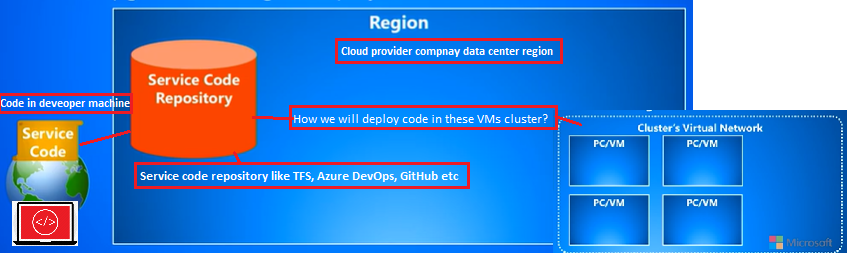
Above picture show how everything setup. We have 3 things

1.       Developer machine with service code:  Developer develop and update the code 

2.       Service code repository: It will help us to deploy the code in VMs

3.       Region: Cloud provider company data centre region  

4.       Cluster of VMs:  Here we will deploy the service code and execute it

This is the whole picture of service Orchestrator setup

Above picture 2 new items

1.       Service users: They will use our service which we have developed and deployed on VMs

2.       Load Balancer:  It help Orchestrator to manage traffic between VMs.

Orchestrator auto repair the machine if any machine failed due to some reason and mange the traffic between VMs which online that time.
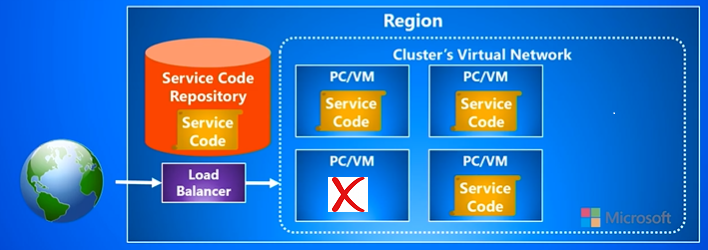

In above example left bottom VMs goes offline due to some reasons. Now if any new request come for our service then Orchestrator know that one machine is offline, so it sends request to other 3 VMs which available to service the request. Meantime Orchestrator try to repair a machine with some automatic software tools if it is not possible for Orchestrator to make the machine online. If that is the case may be VMs offline due to some hardware reason they need to be fixed by network engineers in datacenter.  Same time Orchestrator will create new machine (VMs) and deploy the service code on it.


You can see bottom left machine replaced with newly created right top VM. Now you can see Orchestrator try to repair the VM if not able to repair create new VM and serve the client request.

Everything working in below gif image


Hope it will help you to design your application Orchestrator independent so in future you want change Orchestrator when required. May be in future new Orchestrator come into cloud world.  

Keep share keep learning

Saturday, June 20, 2020

Why and how to design a cloud app

When we are talking about cloud application. One question come in our mind what the difference between web application and cloud application. Cloud application basically web application which used cloud provider company infrastructure for application hosting and these cloud applications resilient to failure. In cloud world hardware can fail any time, so our application design helps us to overcome these situations. If any failure arises in our application, it will automatically restart the process and try again. Cloud provider companies have automated everything with help of software's. Anything failed or crashed it automatically restart, retry and try to fix it. It clouds world very less human interaction required for server maintenance. In below given difference between web application vs cloud application.

Web based application

A company owns and operates some servers and hosts their website on it, we would call that a web-based application.

Cloud based application

If that company moved their web application to Amazon Aws (Azure, Google) owned servers, I would call that same application as a cloud-based application.

Some features provided by a cloud provider, that is not available on regular web servers.

1.       Fast scale out and scale in ability.

2.       Ability to just pay for what you use.

3.       Outsource the maintenance of the server and its security to the cloud provider.

4.       Out of the box monitoring features.

Keep in mind Amazon themselves started out as a web application. Then they grew huge and started letting others use their servers for a fee and hence started getting called the “cloud”.

Why and how to design a cloud app?

The big question is why cloud applications in the first place and why do they require a different way of thinking or mindset. In the past we think for small group of people(enterprise or company) as user and now anyone(public or whole world) can use the application. Now days different type of users, different countries and they use different type of languages and different type of requirements. When we design application now need to consider these points as well. Now you know we need a different type of mindset for distributed cloud application. In the below table it show what we think about application design in past(web application) vs thinking now (cloud application). 

“Distributed cloud applications we assume that failure is always possible. We take that into account very early on when design application architecture”

More information about "Distributed Cloud Apps" by Jeffrey Richter

Client (User)

In the past we used to think of our services for the enterprise internet so with generally very small or enterprise you saw for example one hundred thousand employees and maybe you have some partners that you work with to but we're generally not talking in the millions are tens of millions are hundreds of millions. The people but today we're building services that are access by the public at large and the public it is a worldwide set of people from lots of different countries across the right so that the scale is will be different now.

Demand

We were building the services for small people (small number of users). It was a set of the man (small number of users) but now you're hoping that it will be used by public (large number of people). If the service starts doing well more and more people will adopt the service and if it's doing great that even more people will up the service. It's hard to know in advance when you're designing the service well. That’s why in advance when you're designing the service you have to make sure this application will be used by lot of people.  You would prefer massive growth over time. We design things for scale kind of from the beginning so that it can scale well as the load increases.

Data center

Data center feature come in the past with single tenant that is you would sell up a service and that would be the only customer the hitting that service. If you had another customer, you would stand up another instance of that service, they would be isolated or separate from one another. In Public cloud data centers have multi-tenant where your code is running on the same machine is some other companies code and now you're competing for hardware resources. This situation we have this problem is called the noisy neighbor problem. Where your code might be placed on a node with some the else but that somebody else is getting a lot of network traffic and they're using a lot of memory and that could adverse effect your service because you happen to be end up being placed on the same box. These kinds of things need to be thought about and consider and when you're designing your service now.

Operations

Past we would use people for operations and of course we must pay their salaries and you have to deal with things like the operating system upgrading the hardware operating the networking infrastructure and so on. Now days and age, we're trying to get more automation point of view where these things are just happening automatically. Which makes it much cheaper around the service. That's a lot of the benefit that people see going with a public cloud provider is that they don't have to worry about the network infrastructure they don't have to worry about the load balancers they don't have to worry about the hardware device, power supply failure and network router fails.

We can also automate our code deployment process (DevOps). We take the code that developers had written and going to check that in and then we automatically build that code, run tests and deploy code into the cluster ideally without any human intervention. It just can happen on a regular basis several times a day and want to service running in the data centers all time. This allows you to be very agile and responses to customers whom like be reporting bugs or might be desiring new feature. It's just a great way to get into this rolling process of that whole thing and we can do it very inexpensively without any human involvement.

Scale

Scale is very closely related to the demand feature. As we know few reliable pcs that is your company have a lot of ram in them and very fast hard disks which makes these pcs (servers) expensive. These pcs(servers) used in past for application scale. Scaling is very expensive in past and it takes time to prepare expensive machines.

Now days when we are using cloud computing. This is new mindset we are trying to get lots of cheaper inexpensive pcs (servers). We just assume that failure is going to happen anytime. Distributed cloud applications we assume that failure is always possible. Scaling we can do easily everything done automatically.

Failure

In past we used very expensive machines for application deployment there chances very less of failure. Now days we are using cheap machines (in cloud) they may be failed any time. When we design new application, it will be resilient to failure.  

Machine loss

As we have talked above in past application generally used expensive server. It is catastrophic (extremely unfortunate) if there any server failed. Now days cloud application used cloud provider cheap server, so it is very likely to loss machines.

Resilient to failure

We must do things differently when building cost-effective, failure- resilient solutions for cloud application. These 2 points need to consider when design application.  In past when exception arise application just log those with help of logger library and skip that step. Now days exceptions can arise anytime so our application can handle these exception and automatically restart the process and try again.

Exceptions

In past when any exceptions arise it catch the exception and log it somewhere (txt file and database) with help of logger library but application keep running and skip that step. Now days in cloud application as you know hardware failure is very likely it can be crash any time so if there any exception arise. It will restart the application and try to execute the process again.         

Communication

As You know in past application communicate in sequence and application flow in sequential manner. If communication failed due to some reason it will stuck. User has to retry again. In Cloud application failure can arise any time when if anything failed. It will try again automatically. Application flow in not sequential it helps it to retry again.

Why cloud application failures may happen?

Some reasons why a service instance may fail (stop) in cloud infrastructure

1.       Developer: Unhandled exception in service code

2.       DevOps: Scaling the number of service instances down if less traffic in service.When we making service instance down (offline)  may be that instance servicing client request due to this it will failure can happen.  

3.       DevOps: Updating service code to a new version in cluster of service instances. This is like above point 2 may be old service code servicing client request and same time we updating new version due to this failure can happen. 

4.       Orchestrator: Moving service code from one machine to another. like above point 2 and 3 this can failed when moving code from one machine to other.

5.       Force majeure: Hardware failure (power supply, overheating, hard disk, network controller, router, bad network cable etc.)

6.       Force majeure: Data center outages (natural disasters, attacks)

Since failure is inevitable & unavoidable, embrace it

1.       Architect assuming failures will happen

2.       Operate services using infrastructure that avoids single points of failure

·         Run multiple instances of services, replicate data to avoid single points of failure.

Keep in mind when you design cloud application it needs to be “Resilient to failure”. Failure can happen any time.

Keep share keep learning

Saturday, May 16, 2020

How cloud computing works?

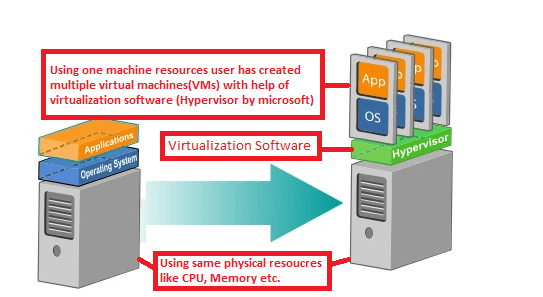
Virtualization is the basic building block for cloud computing, without virtualization cloud computing cannot exist. Virtualization is the process of creating a software-based or virtual (rather than actual), representation of something like server, desktop, storage device, operating system or network resources. Nowadays in market many software exists for Virtualization which used to separate the physical resources of a server and use them as different isolated resources. In below example we have used Hypervisor(developed by Microsoft) for create multiple VMs  

Create multiple VMs using one machine resources

The machine on which the virtual machine is going to create is known as Host Machine and that virtual machine is referred as a Guest Machine

There are mainly 4 types of virtualization

1.       Hardware virtualization

2.       Operating system virtualization

3.       Server virtualization

4.       Storage virtualization

For more information look in below URL

https://www.javatpoint.com/virtualization-in-cloud-computing


Why cloud provider 

Before cloud computing all type of virtualization managed by IT infrastructure team. They do all installation and virtualization in servers. Now cloud provider company have automated these without any human interaction with help of software and hardware.  

Cloud provider companies have created large data centers where they put high configuration multiple servers’ racks with all facilities which needed for computing like power, internet connectivity etc. They are using software to virtualize server based on user request from cloud provider portal. Basically, cloud provider company have automated all virtualization and serve the user request based on there requirement and charge only for what they use and everything else they take care like data backup, hardware, power and internet. If user use cloud they have to focus only on what type of service, they bought from cloud provider everything else take care by cloud provider company.

What is data center

Data centers are often referred to as a singular thing, but it is composed of several technical elements such as routers, switches, security devices, storage systems, servers, application-delivery controllers and more. Theses all technical equipment in data center also requires a significant amount of facilities infrastructure to keep the hardware and software up and running. This includes power subsystems, uninterruptable power supplies (UPS), ventilation and cooling systems, backup generators and cabling to connect to external network operators.

Microsoft data center in Dublin, Ireland

Microsoft data center in Dublin, Ireland

If you want this in detail please look into below URL

https://www.networkworld.com/article/3223692/what-is-a-data-centerhow-its-changed-and-what-you-need-to-know.html

How data centers connected to each other?

Data centers located in different part of the world and connected with fiber cables. You can say whole world covered with fiber cable to transfer data from one data center to other data center. You can see how data centers connected with each other


How it works

We have taken Microsoft Azure example in below picture.

·         User has to login in azure portal then make new request for Create Virtual machine.   

·         Using Microsoft Azure Web API request passed to Orchestrator based on which data-center user chosen

·         We can call these Microsoft Azure Web API from different client tools with parameter or we can write our own application for azure management

·         Every data center have multiple racks of server which attached with fabric controller (Software developed by Microsoft) and that control and manage all the server within that rack.    

·         Every rack has multiple servers and every server has hypervisor (Software developed by Microsoft) for virtualization

·         Based on user request it create virtual machine in data center based on which data center user has selected while doing a request

This is all as working example in below gif image


More information look into below You tube link


How many types of service deployment models

Cloud computing types are service deployment models that let you choose the level of control over your information and types of services you need to provide.

There are three main types of cloud computing services based on level of control to the user

1.       Infrastructure-as-a-service (IaaS)

2.       Platform-as-a-service (PaaS)

3.       Software-as-a-service (SaaS)

In below example when user has physical server (On Premises server), they have to manage everything in that server. If user use cloud service, they have to only control over which type of service they have taken from cloud provider company.  Apart from that service everything else take care by cloud provider company.

When user use cloud they have to focus on the service they bought from cloud provider company. It increases productivity and efficiency of cloud service user.

Below picture give you clear picture about cloud service and what user can control  

Cloud services example 

SaaS is the strongest cloud trend as service like office 365, Google drive, Gmail etc. All service which can directly accessed via web browser.

Keep sharing keep learning. Thank you

Sunday, May 10, 2020

What is cloud?

“The Cloud” is “The Internet”

In simple word cloud computing is automation of computing resources. Just in few click everything available for user without holding any physical computing resources. User can access these all resources from anywhere or any device.  When something is in the cloud, it means it's stored on Internet servers instead of your computer's hard drive. They have to pay only what they have used. 


There are mainly three of services available in cloud

1.       SaaS

2.       PaaS

3.       IaaS

All the emails in a web-based service are stored on servers rather than on your computer's hard drive. This means you can access your email from any computer with an Internet connection. It also means you'll be able to recover your emails if something happens to your computer. This is called SaaS service. We are using software as service for email. Any Developer can create new software as SaaS services with help of IaaS and PaaS.

Basically, IaaS and PaaS services provided by Cloud service provider companies like AWS, Azure, Google etc. If you want to use cloud computing, you must buy a subscription from these cloud provider company. User must create user id and password to login into portal. After login in portal they can choose the computing service they want to use. Every service has different price plan based on computing power and configuration. Cloud service provider charge to user only what they use. If you want to use cloud computing in any application, please choose computing power very carefully. I will tell you more about it in future post.